
Emerald Venezia1.4.1 - Google Play
You'll be able to see results in few seconds.
Publisher Description
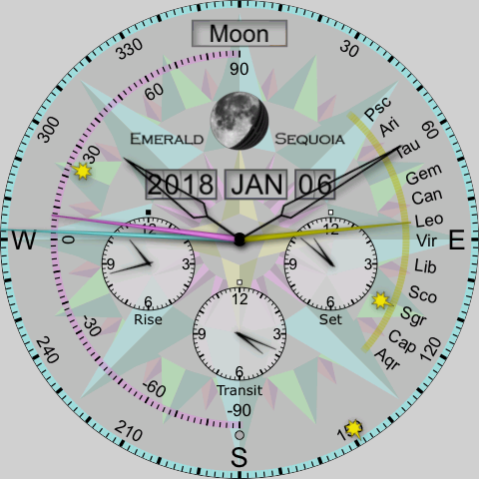
The WearOS watch face Emearld Venezia, an analog watch face, shows info about one planet at a time but lets you select which one. By default, you can tap on the left or right side of the face to advance through the available planets (tapping on the left cycles in one direction; tapping on the right cycles in the other).
In addition to the 5 planets visible to the naked eye, the Sun, and the Moon, all of which are shown on Emerald Miami, Emearld Firenze, and Emerald Padua, this face also can show information about Uranus and Neptune.
The three subdials show the rise, transit, and set times for the selected planet on the current day. The tiny dot above 12 on each one is black for PM, white for AM, and red if there is no such time for the selected planet for this day. (There is always a transit time, which is defined as the time at which the planet crosses the meridian, though at high latitudes it may be below the horizon.)
The long cyan hand indicates the selected planet's azimuth read against the outermost dial. The shorter magenta hand indicates its altitude read against the magenta half-dial. And the yellow hand indicates its position in the zodiac read against the yellow arc on the right. In addition, three tiny sun icons show the position of the Sun on these dials.
Near the top of the dial is a display indicating which planet is selected (a different image is displayed for each planet), with a phase indicator like that of Chandra. The same phase indicator is also shown for the planets, though only the inner planets (Mercury and Venus) have any appreciable phase to display.
The large central hands show hours and minutes in ordinary 12-hour format (but with no dial). The dot just above the six o'clock position is black for PM and white for AM.
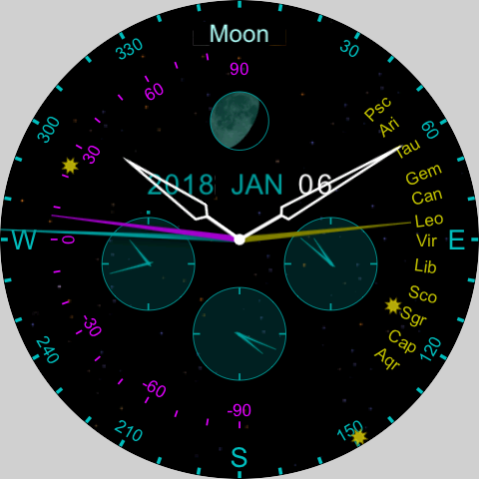
In ambient mode, the same information is displayed, but with different colors to save energy.
No network access is required; only the device time and location are used.
More information is available at the listed website.
About Emerald Venezia
The company that develops Emerald Venezia is Emerald Sequoia LLC. The latest version released by its developer is 1.4.1.
To install Emerald Venezia on your Android device, just click the green Continue To App button above to start the installation process. The app is listed on our website since 2022-11-05 and was downloaded 0 times. We have already checked if the download link is safe, however for your own protection we recommend that you scan the downloaded app with your antivirus. Your antivirus may detect the Emerald Venezia as malware as malware if the download link to com.emeraldsequoia.chronometer.venezia is broken.
How to install Emerald Venezia on your Android device:
- Click on the Continue To App button on our website. This will redirect you to Google Play.
- Once the Emerald Venezia is shown in the Google Play listing of your Android device, you can start its download and installation. Tap on the Install button located below the search bar and to the right of the app icon.
- A pop-up window with the permissions required by Emerald Venezia will be shown. Click on Accept to continue the process.
- Emerald Venezia will be downloaded onto your device, displaying a progress. Once the download completes, the installation will start and you'll get a notification after the installation is finished.
Program Details
System requirements
Download information
Pricing
Version History
version 1.4.1
posted on 2022-11-05
Support latest development environment
version 1.2.1
posted on 2021-09-19
Support for Samsung Galaxy Watch 4
version 1.0.4
posted on 2019-06-02
Fix startup crash on Tag Heuer Connected devices
Disclaimer
Official Google Play Link
We do not host Emerald Venezia on our servers. We did not scan it for viruses, adware, spyware or other type of malware. This app is hosted by Google and passed their terms and conditions to be listed there. We recommend caution when installing it.
The Google Play link for Emerald Venezia is provided to you by apps112.com without any warranties, representations or guarantees of any kind, so access it at your own risk.
If you have questions regarding this particular app contact the publisher directly. For questions about the functionalities of apps112.com contact us.
